🌿 How to Integrate Bloomy Earth with n8n
Here is the complete and updated n8n integration guide, reflecting the new HTTP Basic Auth standard and the removal of the organizationId parameter.

We're currently developing an official n8n integration! A first version is already available as a Community Node here, though it's not yet fully stable for production use.
In the meantime, you can seamlessly connect both platforms using the Bloomy Earth Public API and n8n's HTTP Request node. This guide walks you through the essential steps, explains required fields for each API call, and provides ready-to-import cURL commands for instant configuration. We'll update this documentation once the official integration is production-ready.
I. Prerequisites
1. Bloomy Earth Account Requirements
To use the Bloomy Earth API, you need:
- An active Bloomy Earth account
- A subscription that includes API access:
- Bloomy Roots (pay-as-you-go)
- Bloomy Grove
- Bloomy Forest
- Bloomy Ecosystem
2. API Credentials & Authentication Setup in n8n
Authentication now uses HTTP Basic Auth with your Bloomy Earth platform credentials. The x-api-key header and organizationId parameter are no longer used.
Credentials to Use:
- Username: Your Bloomy Earth platform username.
- Password: Your Bloomy Earth Application Password. You can find and manage this in your dashboard, in the Integration API section: https://www.bloomy.earth/dashboard/#bloomy-integration-api.
Configuring Credentials in n8n:
You have two primary options for setting up these credentials securely in your n8n workflows:
| Method | Steps |
|---|---|
| Via n8n Credentials Manager | 1. Go to Credentials in the left sidebar. <br> 2. Click "New Credential" > Select "Generic Credential Type" > Choose "HTTP Basic Auth". <br> 3. Enter your Bloomy Earth Username and Application Password. <br> 4. Save it with a name like "Bloomy Earth API" and select it in your HTTP Request nodes. |
| Directly in the HTTP Request Node | When configuring an HTTP Request node: <br> 1. In the "Authentication" dropdown, select "Generic Credential Type". <br> 2. For Credential Type, choose "HTTP Basic Auth". <br> 3. Enter your Username and Password directly. |
II. How to Import cURL Commands (Fastest Method for n8n integration)
- Open your HTTP Request node: Inside any workflow → Add node → "HTTP Request"
- Click the "Import cURL" button: Located in the top right corner of the HTTP Request node configuration panel.
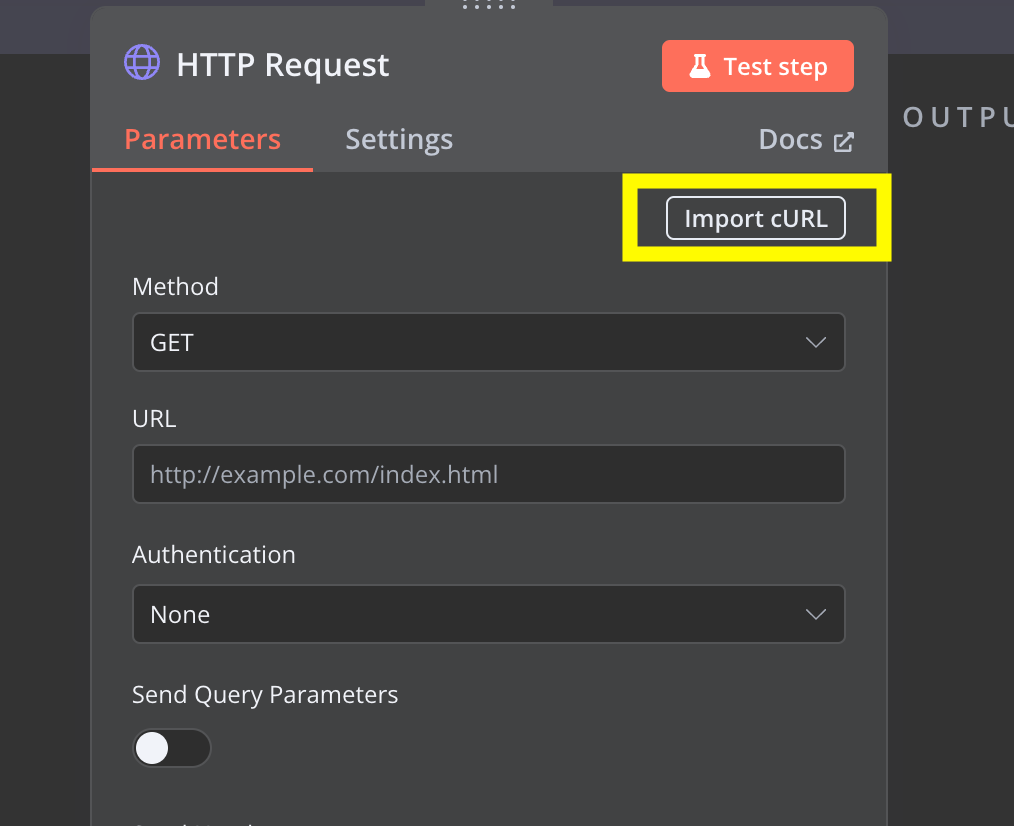
- Paste a cURL: For every Bloomy Earth action described below, we have provided a ready-to-use cURL example that you can directly copy and paste.
- Replace placeholders:
YOUR_USERNAMEandYOUR_APP_PASSWORDwith your actual Bloomy Earth credentials.
n8n automatically populates: Method, URL, Headers, JSON Body, and most importantly, the Authentication settings based on the imported cURL command, streamlining your setup process.
III. Core API Endpoints
1. Plant Trees — POST /v1/trees
Plant trees and generate official planting certificates instantly - This core endpoint allows you to plant a specific number of trees in Bloomy Earth reforestation projects and automatically generate verifiable planting certificates.
Complete API documentation: Plant Trees Endpoint Reference
HTTP Request Configuration:
- Method: POST
- URL:
https://api.bloomy.earth/v1/trees - Authentication: HTTP Basic Auth (using your Bloomy Earth username and app password).
- Headers:
Content-Type: application/json
JSON Body:
{
  "trees": 3,
  "projectId": "2056",
  "sendEmail": true,
  "gift": {
    "giftRecipientName": "John Doe",
    "giftRecipientEmail": "john@example.com",
    "giftMessage": "Your trees have been planted."
  }
}
Field Explanations:
- Required:
trees(minimum 1). - Optional:
projectId,sendEmail,giftobject.projectId: If omitted, trees will be planted in a default project costing 1 credit per tree. Find available projects on your Dashboard.- If gift included:
giftRecipientName(required),giftRecipientEmail(required),giftMessage(optional).
Ready-to-Import cURL:
curl -X POST "https://api.bloomy.earth/v1/trees" \
  -u "YOUR_USERNAME:YOUR_APP_PASSWORD" \
  -H "Content-Type: application/json" \
  -d '{
    "trees": 3,
    "projectId": "2056",
    "sendEmail": true,
    "gift": {
      "giftRecipientName": "John Doe",
      "giftRecipientEmail": "john@example.com",
      "giftMessage": "Your trees have been planted."
    }
  }'
2. Check Credit Balance — GET /v1/credits
Monitor your available tree credits before automated planting - This endpoint retrieves your current Tree Credit balance.
Complete API documentation: Credit Balance Endpoint Reference
HTTP Request Configuration:
- Method: GET
- URL:
https://api.bloomy.earth/v1/credits - Authentication: HTTP Basic Auth.
Response Includes:
credits: remaining tree credits.organizationId: your organization ID (now inferred from your credentials).
Ready-to-Import cURL:
curl -X GET "https://api.bloomy.earth/v1/credits" \
  -u "YOUR_USERNAME:YOUR_APP_PASSWORD"
3. Offset CO₂ by Tonnes — POST /v1/offset-by-tonne
Offset a precise amount of CO₂ emissions. Each tonne corresponds to 20 Tree Credits. Optionally add VCS certification for an extra 10 credits per tonne.
Complete API documentation: CO₂ Offset Endpoint Reference
HTTP Request Configuration:
- Method: POST
- URL:
https://api.bloomy.earth/v1/offset-by-tonne - Authentication: HTTP Basic Auth.
- Headers:
Content-Type: application/json
JSON Body:
{
  "tonnes": 1.25,
  "vcs": true
}
Field Notes:
tonnesmust be greater than 0.vcsenables certified VCS credits if available.
Ready-to-Import cURL:
curl -X POST "https://api.bloomy.earth/v1/offset-by-tonne" \
  -u "YOUR_USERNAME:YOUR_APP_PASSWORD" \
  -H "Content-Type: application/json" \
  -d '{
    "tonnes": 1.25,
    "vcs": true
  }'
4. List Certificates — GET /v1/certificates
Access comprehensive certificate history for dashboards and reporting - Returns a paginated list of all your certificates.
Complete API documentation: List Certificates Endpoint Reference
HTTP Request Configuration:
- Method: GET
- URL:
https://api.bloomy.earth/v1/certificates - Authentication: HTTP Basic Auth.
Query Parameters:
view:summary(default) ordetail.page: page number.perPage: items per page (1-100).
Ready-to-Import cURL:
# Summary view
curl -X GET "https://api.bloomy.earth/v1/certificates?view=summary" \
  -u "YOUR_USERNAME:YOUR_APP_PASSWORD"

# Detailed view
curl -X GET "https://api.bloomy.earth/v1/certificates?view=detail&page=1&perPage=10" \
  -u "YOUR_USERNAME:YOUR_APP_PASSWORD"

# Single certificate
curl -X GET "https://api.bloomy.earth/v1/certificates/CERTIFICATE_ID" \
  -u "YOUR_USERNAME:YOUR_APP_PASSWORD"
5. Post Community Activity — POST /v1/post-activity
Share sustainability achievements with your community - Publishes updates on your Bloomy Earth profile.
Complete API documentation: Post Activity Endpoint Reference
HTTP Request Configuration:
- Method: POST
- URL:
https://api.bloomy.earth/v1/post-activity - Authentication: HTTP Basic Auth.
- Headers:
Content-Type: application/json
JSON Body:
{
  "title": "New trees planted!",
  "content": "We have added 10 new trees to our project."
}
Field Limits:
title: ≤ 120 characters.content: ≤ 3000 plain-text characters after HTML normalization.
Ready-to-Import cURL:
curl -X POST "https://api.bloomy.earth/v1/post-activity" \
  -u "YOUR_USERNAME:YOUR_APP_PASSWORD" \
  -H "Content-Type: application/json" \
  -d '{
    "title": "New trees planted!",
    "content": "We have added 10 new trees to our project."
  }'
IV. Error Handling in n8n
The API returns meaningful error messages in this format:
{
  "error": "RATE_LIMIT",
  "message": "Too many requests",
  "retryAfter": 8
}
Recommended n8n Strategies:
- Use Retry on Fail node configuration.
- Add an IF node to branch success/failure paths.
- Log errors in external systems (Notion, Google Sheets, Airtable).
- Send alerts via Slack or email.
V. Automation Ideas
Combine n8n with Bloomy Earth to build:
- E-commerce: Automatic tree planting for new customers.
- Sustainability: Monthly carbon offset workflows.
- Notifications: Slack/Teams alerts when new certificates are created.
- CRM Integration: Automatic certificate storage in your customer database.
- Impact Dashboards: Notion/Airtable environmental impact tracking.
- Revenue-linked: CO₂ compensation triggered by Stripe revenue.
- Employee Engagement: Gift certificate flows and recognition programs.
VI. You're Fully Equipped
You now have a complete guide for:
- Retrieving and configuring the new HTTP Basic Auth credentials.
- Setting up these credentials securely in n8n.
- Importing updated API calls via cURL commands.
- Calling each Bloomy Earth endpoint correctly.
- Understanding required fields and responses.
- Handling errors effectively.
- Building sustainable automations.
Everything works through simple HTTP requests, making Bloomy Earth's climate actions accessible through any n8n workflow you design.